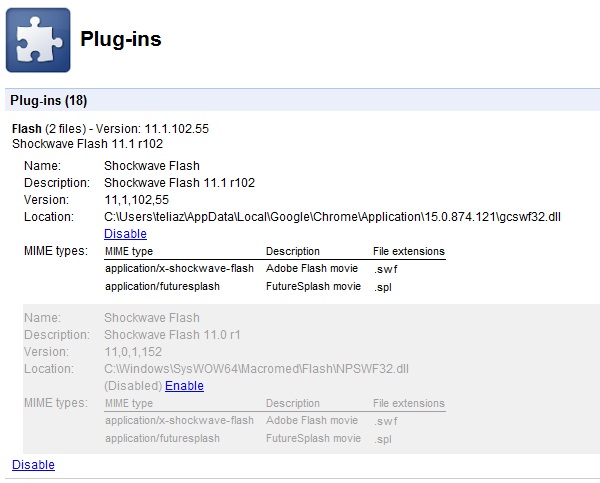
For a couple of months in late 2011 I had a constant issue where Shockwave Flash kept crashing after a while, and I had to restart Chrome to make the browser responsive. The fix was to disable the second, bundled copy of the Flash plugin that Chrome shipped alongside the system one.
The 2011 fix
- Open chrome://plugins/ (or, back then, Options → Under the Hood → Content Settings → Disable individual plug-ins).
- Locate Adobe Flash Player on the list. If it showed “(2 files)”, click Details on the right to expand it.
- Disable the copy whose location pointed at the bundled plugin, e.g.
C:\Windows\SysWOW64\Macromed\Flash\NPSWF32.dll, and keep the system-installed one.
Screenshot of the 2011 plug-ins page — still on this site, for the record:
Reading this in 2026?
This whole page is obsolete, and that is the point: chrome://plugins was removed from Chrome in version 57 (March 2017). Chrome bundled, sandboxed and auto-updated its own Flash Player (Pepper/PPAPI), so the two-copies conflict stopped being a thing — and then Flash itself died. Adobe ended support on December 31, 2020 and started blocking Flash content from running (Adobe Flash EOL), and Chromium removed the plugin machinery entirely (Chromium Flash Roadmap).
What still crashes tabs today is a rogue extension or a hardware-acceleration problem — check chrome://extensions and the graphics settings, not the plug-ins page that no longer exists.